

 العربية
 کوردی
کوردیYou can block specific IP addresses from accessing your website using the IP Blocker tool in cPanel. Follow these steps:
Step One: Access the IP Blocker Tool
- Log in to your cPanel control panel
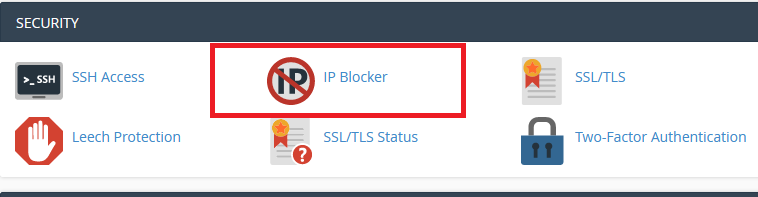
- Navigate to the Security section
- Select the IP Blocker tool as shown in the image below:
Step Two: Open the Blocking Tool
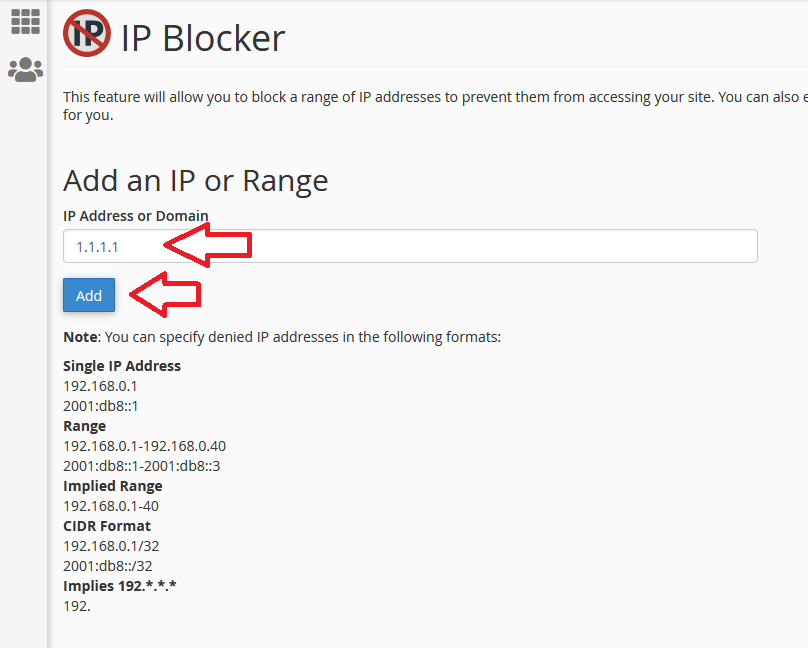
- Navigate to the IP address blocking tool as shown in the image below:
Step Three: Add IP Address to Block List
- In the
IP Address or Domaininput field, enter the IP address you want to block - Click Add to complete the blocking process
Note: You can block a single IP address or an entire range of addresses. Make sure the address is correct before blocking to avoid blocking legitimate visitors.