

 العربية
 کوردی
کوردیChanging the WordPress admin path from the default /wp-admin to a custom path increases your site's security and protects it from hacking attempts.
Security Benefit: Hiding the admin path makes it difficult for hackers to access it.
Method One: Using Protect Your Admin Plugin
Step One: Install Plugin
- From Plugins menu select Add New
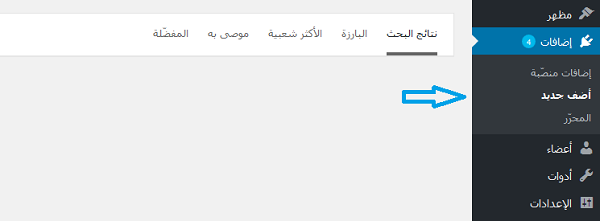
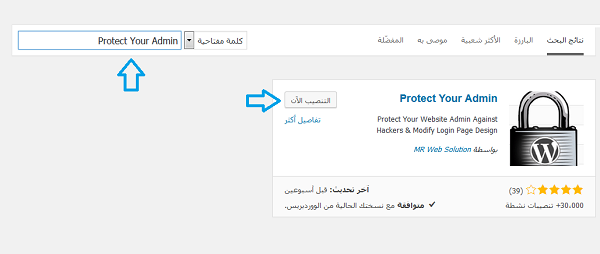
Step Two: Search and Install Plugin
- Search for "Protect Your Admin" plugin
- Click "Install Now" then "Activate"
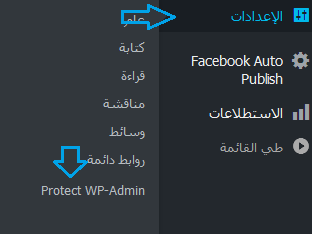
Step Three: Access Plugin Settings
- Go to Settings menu then select "Protect WP Admin"
Step Four: Configure New Path
- Enter the new name for admin panel in the input field
- Select "Enable" option
- Click "Save Settings"
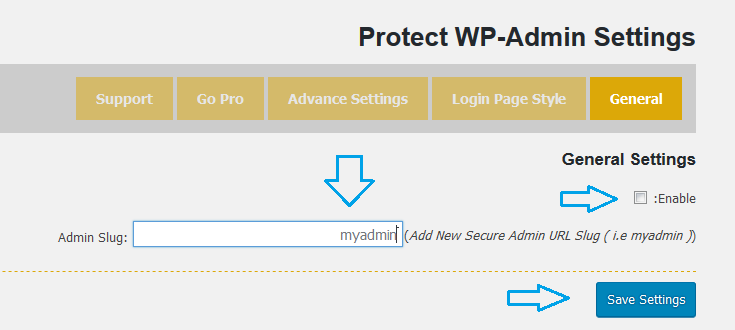
Important: The new name entered is your new URL for accessing WordPress admin instead of
/wp-admin. Keep this path in a safe place!Method Two: Using Change wp-admin login Plugin
Alternative method using "Change wp-admin login" plugin. Watch the video tutorial:
Important Security Tips
- Choose a hard-to-guess path: Avoid names like "admin" or "login"
- Keep the new path safe: Write it down securely to avoid losing it
- Test the path: Make sure the new path works before logging out
- Create backup: Before applying any changes
Emergency Access Recovery
If you lose the new path:
• Deactivate the plugin from cPanel
• Or delete the plugin folder from
• The path will return to default
• Deactivate the plugin from cPanel
• Or delete the plugin folder from
/wp-content/plugins/• The path will return to default
/wp-admin